How to Check for a Medline Rollator Recall
To check for a Medline rollator recall, find the model number and other identifiers on your walker, then compare them with official recall notices from Medline and the U.S. Consumer Product Safety Commission. Follow any notice that matches your exact model.
On this page (6 sections)
- Where can you check for a Medline rollator recall?
- How do you identify your Medline rollator model?
- What details in a recall notice should you match?
- What should you do if a notice matches your walker?
- Which rollator details matter when comparing options?
- How can you keep recall information easy to find?
To check for a Medline rollator recall, find your walker’s model number and compare it with official notices from Medline and the U.S. Consumer Product Safety Commission (CPSC).
If a notice matches, follow its instructions and contact Medline if any identifier is unclear.
A similar name or appearance is not enough to confirm a recall. Match the exact model and any serial number, production date, or other identifier named in the notice.
Where can you check for a Medline rollator recall?
Check Medline’s official recall or safety information and the CPSC recall database. Search for “Medline rollator” and review the full notice, including the affected product identifiers and recommended steps.
Use the CPSC’s recall search to find notices and read their details. If you find a possible match, confirm it with Medline through contact details on Medline’s official website rather than relying on a search snippet or an old post.
A search with no result is not proof that a walker is safe or that no notice exists. Try the model number as well as the brand and product type, and contact Medline if you are unsure.
How do you identify your Medline rollator model?
Look for a model number on the walker’s frame, product label, manual, or original paperwork. Record the number exactly, including letters and any suffix, before comparing it with a notice.
The Medline Steel Rollator Walker with Seat has model number MDS86850ESKD. That identifier applies to this named model; check the label on your own walker rather than assuming every Medline rollator uses it.
If the label is worn, missing, or hard to read, take a clear photo of the frame and any remaining markings. Medline can help identify the unit from its details.
What should you write down before contacting Medline?
Write down the model number, serial number if present, and any date or lot code shown on the walker or its paperwork. Keep the purchase record nearby if you still have it.
Tell Medline what you see and ask whether those identifiers fall within an active safety notice. Avoid sharing personal details publicly in a forum or social media post.
What details in a recall notice should you match?
Match every identifier the notice names, not just “Medline” or “rollator.” A notice may apply only to a particular model, serial-number range, date range, or product version.
Read the notice for photos, affected colors or configurations, and the reason for the recall. Then compare each available detail with your walker and its paperwork.
If the notice names a model number that differs from yours, do not assume the recall applies. If the wording is unclear or your identifiers are incomplete, contact Medline or the CPSC for help confirming the match.
What should you do if a notice matches your walker?
Follow the notice’s directions and stop using the rollator if it says to do so. The notice will explain the next steps, such as how to confirm the unit or request a remedy.
Keep the walker and its identifying information available until Medline explains what to do. Don’t attempt repairs or changes unless the official instructions tell you to.
If you rely on a rollator for daily movement, plan another way to get around while you resolve the issue. These guides can help you think through options: who should not use a rollator, how to use a walker correctly, and walking with a rollator.
Which rollator details matter when comparing options?
Compare model identifiers, frame details, and the features you need for everyday use. A replacement choice should fit your needs and abilities, but a different model is not automatically safer just because it has a different name.
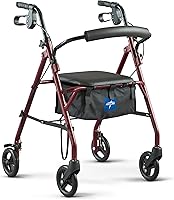
The Medline Steel Rollator Walker with Seat has a steel frame, padded seat and backrest, storage under the seat, and adjustable handles. Its model number is MDS86850ESKD.
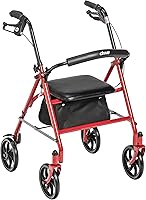
The Drive Medical Rollator Walker with Seat has a steel frame, padded seat, locking hand brake, height-adjustable handles, and a fold-down backrest.
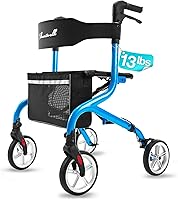
The PLANET WALK Super Lightweight Rollator Walker has an aluminum frame, a seat and backrest, and a one-hand folding design.
Check fit, safe use, and the manufacturer’s instructions before choosing any mobility aid. If you are weighing a rollator against another option, see Rollator vs Wheelchair: A Senior’s Guide.
How can you keep recall information easy to find?
Save the official notice and keep your walker’s identifiers together. A photo of the model label and a copy of the manual can make future checks easier.
Recheck official sources if you hear about a possible safety issue, and contact Medline when details do not match clearly. For other mobility equipment questions, see what range of motion is needed to use a hemi walker.
For a Medline rollator recall check, trust an exact identifier match and the official notice’s instructions. If your model, serial number, or production details are unclear, ask Medline or the CPSC to confirm before deciding what to do.
Frequently asked questions
How do I check if my Medline rollator has been recalled?
Find the model number and any other identifying details on the walker, then compare them with recall notices from Medline and the U.S. Consumer Product Safety Commission.
Match the exact model and any serial or date range in the notice.
If you cannot confirm the match, contact Medline using its official contact information.
Where can I find my Medline rollator model number?
Check the frame, product label, or paperwork that came with the rollator for a model number. The Medline Steel Rollator Walker with Seat has model number MDS86850ESKD, but confirm the number on your own walker because models can differ.
Contact Medline if the label is missing or hard to read.
Should I use a rollator while checking for a recall?
If you find a notice that appears to match your rollator, follow the safety steps in that notice before using it again. If you cannot tell whether it applies, pause use and contact Medline or the CPSC for guidance.
Do not rely on a similar-looking model name alone.
What should I do if my rollator is recalled?
Follow the recall notice's instructions, which may explain whether to stop using the rollator, how to confirm eligibility, and what remedy is available. Keep the model and serial information handy when contacting the manufacturer.
Don't modify the walker or discard it until you understand the official instructions.